
From first read to signed client.
Everything Gatedleads does, in one place. Build the page, capture the lead, follow up, see what works, and run it all for your clients, without wiring five tools together.
Every client, one login. Your name on all of it.
Set up every client in one go, give each one a login that only shows their own work, and send them a report with your logo on it each month. Gatedleads stays out of sight.
Example agency, clients and numbers.
Everything for running clients
On the Agency plan: $149 a month for 10 clients, then $10 for each extra client.
A space for every client
Each client has their own pages, leads, brand kit, domains and Zapier, kept apart from the rest.
Add every client at once
Paste a list of client websites. Each becomes its own space, with their logo and colours picked up for you.
White label
Your name, logo and colour on the dashboard, sign-in screens and emails. No Gatedleads name, prices or upgrade buttons.
Your own addresses
Clients sign in at your own address, like app.youragency.com, and pages live on your page address.
Client logins
Invite a client to see their own pages and leads, or to edit too. They never see your other clients or any billing.
Approvals
Send a page to the client for a yes. They preview it from their own login before anything goes live.
Monthly client reports
Views, leads, best pages and where sign-ups came from, as a PDF in your brand, ready to email to the client.
Playbooks
Save a set of pages once and roll it out to any client as drafts, ready to make theirs.
10 team seats with client roles
Give each team member only the clients they work on, with the access they need.
Activity log
See who changed what across every client, so nothing happens without a trace.
Client invoices
Keep track of what each client owes, with Paid and Due at a glance and your own pay link.
Emails from the client’s domain
Follow-up emails go out from each client’s own domain, under their name.
A pipeline per client
Every client gets their own Leads board, with stages and fields set up their way.
One-click handover
When a client moves on, hand over their whole space, pages and leads included.
Change anything. Your live page stays safe.
Everything about your page sits in four places: the Page, its Look, the Form and Settings. Try a new Style, rewrite a section, change what the form asks, then publish when you are happy.
One click, a whole new look. In your brand colours.
Twelve Styles restyle the type, colour, spacing, header and motion of the whole page at once, and you can still change any detail yourself.
Add your website and your logo and colours are picked up for you. Change any detail yourself, or let a Style do it all.
Give them something they can actually use.
A download gets skimmed. A score, a number worked out for them, an AI skill they use every week or a playbook worth paying for gets read, and remembered.
Quizzes and scorecards that people finish.
Visitors answer a few questions, then sign up to see what their score means. You learn about every lead before you speak.
Calculators that show the cost of waiting.
Charge for your best work.
Add your own Stripe or PayPal link. Buyers pay you directly, the page unlocks, and they still join your list.
Hand over an AI skill, not another PDF.
Turn your method into instructions people use in their own AI. After they sign up they download it for Claude or copy it into ChatGPT, with three simple steps to set it up. They come back to it every week.
- Write it, upload a SKILL.md file or start from a ready skill
- The instructions stay hidden until they sign up
Everything for building your page
Every template, look and block is free on every plan.
800+ templates
Finished pages with real example words, for every kind of business. Pick one and make it yours.
Page wizard
Answer four short questions and your page is ready to check. Live in under 10 minutes.
Brand reader
Add your website and your logo and colours are picked up for you, ready for every page.
Start from your website
Paste your website address and get a first lead magnet built in your own name, logo, colours and fonts.
One-click Styles
Restyle the type, colour, spacing, header and motion of the whole page at once, then change any detail.
Brand kit
Save your logo, colours and fonts once and apply them to any page. Pro keeps a kit for each brand.
Drag and drop blocks
Checklists, steps, comparisons, key numbers, quotes, FAQs, images, video, buttons and more.
Scorecards and quizzes
Visitors answer a few questions, then sign up to see their score and what it means.
Calculators
Work out a number for each visitor, like the cost of waiting, with the answer behind the form.
Fill-in generators
Visitors fill in a few blanks and get something written for them once they sign up.
AI skills
Hand over a ready-made skill people use in their own AI, like Claude or ChatGPT, after they sign up.
Notion and Sheets templates
Give away a Notion, Google Sheets or Canva template. After sign-up, people copy it into their own account in one click.
Prompt packs
Ready prompts for ChatGPT or Claude, each with its own copy button, unlocked when people sign up.
Quiz funnels
Ready-made quiz pages that sort each visitor and send them to the right next step.
- Pro
Pay to unlock
Charge for your best work with your own Stripe or PayPal link. Buyers still join your list.
Files after sign-up
Attach a PDF or other file up to 25MB that people can download once they sign up.
Drafts, autosave and versions
Changes save as you go and wait until you publish. Bring back any earlier version in one click.
Private preview links
Send a link so someone can check the page before it goes live.
Folders
Keep pages for each offer or campaign tidy, and pin the ones you use most.
Light or dark, fonts and motion
Choose light or dark for each page, a font that suits you and gentle motion if you want it.
Live on your own address. Ready for sign-ups.
Every page is hosted for you and safe to visit. On Pro, put it on your own domain, ask for exactly what you need, and send people straight to the next step.
Everything for capturing leads
Your page is hosted for you, with nothing to install or connect.
Ask for the email where it fits
Up front, part way down, after a while on the page, or when they choose to read on.
A form that asks what you need
Name, phone and company if you want them, up to three questions of your own and a consent tick.
Locked words stay locked
The rest of the page is never sent to the browser before sign-up, so it cannot be read from the page source.
Returning readers stay in
Someone who signed up keeps access for a year without typing their email again.
The next step, straight away
Show the rest of the page at once, or send people to your calendar, a call or your shop.
Double opt-in
Ask new sign-ups to confirm their email, so your list stays clean.
- Pro
Your own domain
Put pages on an address like guide.yoursite.com, with the security certificate set up for you.
- Pro
Embed on your website
Copy one snippet to show a page inside the website you already have.
Search settings
Set the title and description for search and sharing, or hide a page from search engines.
Hosted in the UK
Pages, leads and backups stay on servers in the United Kingdom. Anyone can ask to be removed.
The sign-up is the start. Your emails do the rest.
Write a few short emails once, and they go out to every new lead on the days you choose, from your own domain. Nothing else to connect, no Zapier and no email tool.
- Day 0Right after sign-upWaitingThanks for reading, SarahA short thank you and a link back to the guide
- Day 1The next dayWaitingThe step most people skipStep 4, and how to do it in 15 minutes
- Day 3Two days laterWaitingWant a hand with yours?An invitation to book a 20 minute call
- Up to 3 emails a page on ProUp to 7 on Agency. Any day from the day they sign up to two months later.
- From your own domainSet up once, and every email comes from you, not from us.
- Respectful by defaultAn unsubscribe link and your business address in every email, and the series stops the moment they opt out.
The sale and revenue above are an example of what a reply can lead to. Gatedleads sends the emails; the selling is yours.
Every lead, in order. From sign-up to signed.
Your leads land on a board as they sign up. Drag each one along as you talk, add notes and a reminder to follow up, and see what is still open at a glance. No separate CRM to pay for or connect.
- Sarah Jones$2,400
- Theo James
- Mia ChenEmail 1 of 3 sent
- Leo Hughes$1,200Email 2 of 3 sent
- Tayla Thomas$3,600Follow up Thu
- Ben Murphy$4,800
- Board or list, on every planSearch, filter, sort and export. A list of 500 leads still scrolls smoothly.
- Your own stages and fields on ProRename and reorder stages, add a value, a dropdown or a date, and make a field required before a lead can be won.
- A pipeline per client on AgencySet one up once, copy it to every client, and see each client's pipeline from your overview.
Winning or losing a lead stops their follow-up emails, and a reply moves them to Contacted for you.
Everything for following up
Turn a sign-up into a conversation without another tool.
A lead alert every time
An email the moment someone signs up, with who they are and where they came from.
- Pro
Follow-up emails
Write a few emails once and they go to every new lead on the days you pick. 3 per page on Pro, 7 on Agency.
- Pro
Send from your own domain
Set it up once and every email comes from you, not from us.
- Pro
Opens, clicks and subject tests
See what gets read and clicked, and test two subject lines to find the better one.
- Pro
Replies come to you
When a lead replies, the emails stop and the reply lands with you.
Leads board
Move each lead from New to Won, with a value, notes, a follow-up date and a full history.
- Pro
Your own stages and fields
Name the stages your way and add the fields you need on every lead.
Going cold and due today
Leads that have gone quiet and follow-ups due today are flagged, so nobody slips.
Import and export
Bring leads in from a spreadsheet and download every lead as a CSV whenever you like.
- Pro
Leads straight to your tools
Connect Google Sheets, Notion, HubSpot, GoHighLevel or Mailchimp once and every new lead is added there for you. No Zapier needed.
- Pro
Zapier and webhooks
For anything else, send each lead on to your CRM, email tool or spreadsheet the moment it arrives.
Every sign-up, where you need it.
The moment someone signs up you get an email, the lead is saved to your dashboard and, on Pro, your follow-up emails go out to them by themselves.
An email the moment it happens
Emails your leads, for you
- Day 0Your copy of the client checklistWaiting
- Day 1The step most people skip
- Day 3Want a hand with yours?
Write a few short emails once. Every new lead gets them on the days and times you pick, from your name and your own domain.
Know where they come from
Leads this month
Test two headlines
Gatedleads splits visitors between them and shows which one signs more people up.
ProBook the call next
A button of your choice appears the moment someone signs up: your calendar, a call or your shop.
Your ads, measured
Add your Google tag and Meta pixel to any page. Every sign-up is sent as a lead event, so you can see which ads bring people in.
Download every lead as a CSV on any plan, or on Pro send it straight to your CRM or sheet.
Tracking on ProEverything for knowing what works
Plain numbers in tables you can read at a glance.
Page analytics
Views, sign-ups and conversion for every page, over 7, 30 or 90 days.
Where sign-ups come from
Every lead is tagged with its source and campaign, so you know which posts and links work.
- Pro
Headline testing
Try two headlines. Visitors are split between them and you see which signs up more people.
- Pro
Google and Meta tracking
Add your Google tag and Meta pixel. Every sign-up is sent as a lead event for your ads.
A to-do list each morning
Your Overview shows what needs you today: new leads, follow-ups due and pages to finish.
Ask Claude to make the page while you get on with your day.
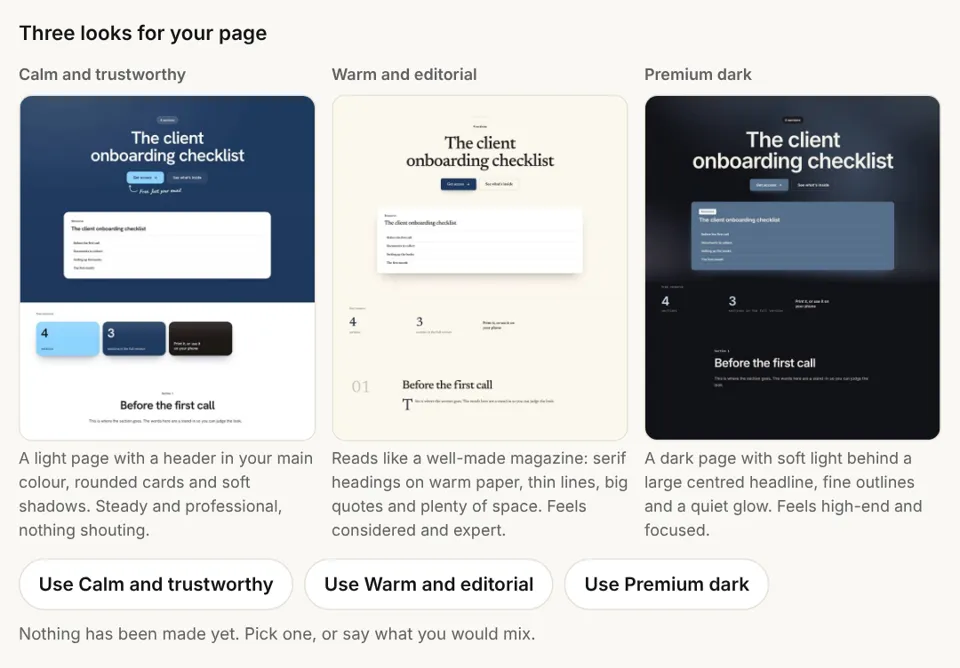
Connect the assistant you already use and ask in plain words. It suggests ideas, shows you three looks, writes every section, checks the page on a phone and a computer, and saves a draft for you to publish.
Works with the assistant you already pay for.
Pick yours. It connects in a minute, and the light turns green when it is ready.
Everything that works with your AI
Included with Pro and Agency.
Connect your AI assistant
Claude, ChatGPT, Gemini, Grok and other assistants can work on your account.
A whole page from a chat
It asks about your business once, suggests ideas, agrees an outline, then writes and designs the full page.
You choose what it can do
Editing, publishing and reading leads are separate ticks. New pages are drafts until you say so.
Undo anything
Every change it makes can be undone, and it can never delete a live page or a lead.
It knows your leads
With your say-so it reads your Leads board, moves leads on and writes your follow-up emails.
A launch kit for every page
Your address, a QR code and a tagged link for each place you share it.
Chrome and Edge extension
Turn any web page, Google Doc or PDF into a gated page in a couple of clicks.
Simple plans. The free one really is free.
Every plan hosts your pages for you, so there is no website or hosting to pay for. Start free with one page, and upgrade when you want more.
- A page hosted on gatedleads.com
- 1 lead magnet page
- Every template and all twelve Styles
- A leads board and list
- An email alert on every new lead
- Unlimited lead magnet pages
- Your own domain, HTTPS included
- AI assistants build pages for you
- A lite CRM with your own stages
- Up to 3 follow-up emails a page
- A space for every client
- White label sign-in at your own address
- Client logins that only see their own work
- A leads pipeline per client
- 10 team seats
Every plan includes: hosting with HTTPS, every template, quizzes and calculators, a leads board, CSV export.
Building pages for one business? Pro is the better fit. Prices in US dollars. How we keep your leads safe.
Turn your guides, reports, checklists and playbooks into lead magnets that capture emails.
Build your first lead magnetFree plan. No card needed.
- Set up in minutes
- 30-day money-back guarantee on Pro